Transform Your Home into a Smarter Living Space with Koble. Schedule an appointment today at 8129 4164!

Transform Your Home into a Smarter Living Space with Koble. Schedule an appointment today at 8129 4164!

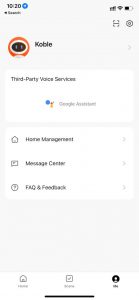
The following sections and icon are displayed on the Me page:
1. Third-Party Integration: The app supports seven third-party voice assistants.
2. Home Management: Tap Home Management to manage homes and home members.
3. Message Center: Three types of messages are displayed in Message Centre, including Alarm, Home, and Bulletin. Specify a do-not-disturb period for these messages.
4. FAQ & Feedback: Tap FAQ & Feedback to show the FAQs & Feedback page. On this page, tap My feedback in the top right corner of the page to view feedback records, view FAQs and FAQ categories, report issues, and enter keywords to search for FAQs.
5. Featured: The featured services include Cloud Storage for Cameras, Phone Notifications, and Message Notifications.
6. HomeKit Information: HomeKit-compatible devices can also be controlled with the app.
7. Watch: Tap Watch to check available devices and tap-to-run scenes. The Watch section appears on the app only when an Apple Watch is bound with the user’s iPhone.
8. On the Me page, tap the Settings icon to go to the Settings page. The following options are available: Personal Information, Account and Security, Sound, App Notification, Scan device in the homepage, Dark Mode, Temperature Unit, About, Privacy Settings, Network Diagnosis, Clear Cache, and Log Out.
Koble Showroom
(With Smart Home Specialist)
Your First Smart Home in Singapore: Where to Start (And Why It’s Not as Complicated as It Sounds)
August 15, 2025
Smart Doors and Windows for Modern Living Spaces
December 14, 2023
Creating a Smarter, Happier Home For Your Family
October 3, 2023
What Is a Smart Home? (And Why More People in Singapore Are Upgrading in 2025)
April 17, 2025
Koble Smart Home