Transform Your Home into a Smarter Living Space with Koble. Schedule an appointment today at 8129 4164!

Transform Your Home into a Smarter Living Space with Koble. Schedule an appointment today at 8129 4164!
Dreaming of a home that lights up, cools down, and automates all with just one tap (or even voice command)? You’re in the right place. We’re here to help you kickstart your smart home journey, minus the tech headaches and confusion.
Setting up your first smart home can seem like a lot. So many brands! So many features! And let’s not even get started on whether your lights talk to your switches, or if your app knows what your sensor is sensing. But don’t worry, this guide is here to hold your hand and walk you through the basics.
At Koble, we believe your home should work for you—not the other way around. That’s why we’ve picked smart devices that play well together, are built to last, and are fuss-free to set up. We’re also big on keeping things secure, so you can enjoy peace of mind knowing your personal data stays safe and sound.
We totally understand that tech can be tricky, especially if you’re not the “IT person” in the family. That’s why our guide keeps it simple, skips the jargon, and gives you real, practical tips. From choosing the right devices to connecting it all on one app, we’ve got you covered.
Worried about blowing your budget? Don’t be. We’ll show you how to build your smart home step by step, based on your lifestyle (and wallet). Plus, every smart home product on our platform has been carefully tested and backed by solid warranties so you can shop with peace of mind.
And, one last thing, your Wi-Fi is the backbone of your smart home. A strong, stable connection keeps everything running smoothly, from lights to security cameras. We’ve included some practical networking tips to help you get the best performance out of your setup.
Ready to get started? Let’s build a smart home that’s simple, seamless and secure.
Whether you’re living in a modern apartment or a spacious landed property, a thoughtfully designed smart home setup can make everyday tasks feel effortless and even a little magical. But there’s no one-size-fits-all solution. Your setup should suit your lifestyle, home type, and how “hands-free” you want to go.
Here’s a deep dive into Basic and Advanced smart home setups, tailored to your home type so you know what’s possible and where to begin.
Whether it’s a cosy 2-bedder or a roomy 5-room flat, here’s how to smarten it up.
These are your must-haves for day-to-day convenience, comfort, and security.
Light up your life with flexible control and personalised ambience.
Best Spots: Living room, bedrooms, study, hallway, or anywhere mood and function matter.
Not sure if you should go for smart switches or smart bulbs—or both? Click here
Add brains to your existing aircon without replacing the unit. Control non-smart aircons using an infrared controller linked to your app or voice assistant.
Great For: Bedrooms, baby rooms, or anywhere you want precise climate control.
Welcome home the smart way! No keys, no fuss.
Ideal For: Main entrances, back doors, or even your home office.
Turn ordinary appliances into smart ones—just plug and play.
Perfect For: Bedroom fans, study lamps, kitchen appliances, or pet feeders.
Smart lighting that knows when you’re there (and when you’re not).
Useful For: Hallways, bathrooms, staircases, kids’ rooms, door poach or anywhere you want hands-free lighting.
Your front door’s new best friend—smart, safe, and always on watch.
Perfect For: HDB units, condos, and landed properties. Whether you’re in or out, you’re always connected.
Here’s where smart starts feeling futuristic.
Got an extra button or two on your smart switch? Put them to good use!
Tip: These are great for common areas like the living room, hallway, or bedrooms where you want convenient, physical access to your favourite scenes—especially for guests or older family members who might not use voice/app control.
Turn your front door into a smart scene starter.
Ideal For: Main entrances and secondary doors, creating a seamless entry experience.
When no one’s supposed to be home, your motion sensors can be set to act as part of a security scene. Here’s how it works:
Perfect For: Entrances, stairwells, patios, and anywhere that needs passive surveillance.
Next-level automation that understands presence, not just motion.
Recommended For: Living rooms, study rooms, bedrooms—anywhere occupancy varies throughout the day.
Smart comfort that balances efficiency and wellness.
Best Paired With: Bedrooms, nurseries, or areas with poor ventilation.
Natural light control made effortless.
Perfect For: Bedrooms, living rooms, and balconies
More space, more possibilities. Here’s how to make the most of it.
Welcome guests or accept deliveries—all without stepping outside.
Best Used For: Front gate automation, secure deliveries, and seamless entry for family and guests.
Wall-mounted control panels that put every room at your fingertips.
Pro Tip: Place panels near entrances or common areas so everyone in the household can easily manage the smart features around them.
Control your lights, fans, and other appliances effortlessly.
Not sure if you need smart switches, smart bulbs—or both? [Click here]
Make any regular aircon smarter with an IR controller.
Pro Tip: Set temperature rules based on time of day to balance comfort and energy savings.
Safe, keyless entry designed for larger households.
Smart Home Insight: A good smart door lock increases both convenience and peace of mind especially when integrated into welcome or leave-home scenes.
Smart Plugs for Non-Smart Devices
Give your regular appliances a smart upgrade.
Pro Tip: Use energy monitoring to identify high-consumption appliances and save on bills.
Your home reacts when you walk by.
Smart Home Insight: Motion sensors improve both convenience and safety especially in large or multi-floor homes.
Always know who’s at the door whether you’re home or away.
Pro Tip: Pair with your smart lock or gate control to grant access remotely and securely.
With more space comes more smart opportunities. From comfort to convenience to complete control, here’s how to create a fully responsive home environment that works for you and your family.
Secure your perimeter intelligently.
Best Used For: Front gates, backyards, garages, entryways, and blind spots around the property. Integrate with smart locks and indoor sensors for seamless security coverage.
Turn extra buttons on your smart switch into powerful one-tap scene triggers.
Best Used For: Best placed in common areas or entryways for quick access to your most-used routines. Great for guests and family members who prefer physical controls.
Make your front door the cue for an instant welcome home.
Smart Pairing Tip: Combine with motion or presence sensors to continue adjusting lighting as you move through the house. Works beautifully when coming home hands full from errands.
Unlike basic motion sensors, presence sensors detect subtle movement like sitting or typing. This means lights stay on when you’re still in the room.
Best Used For: Bedrooms, study rooms, living areas, and bathrooms especially useful when watching TV, working, or nursing a baby where traditional motion sensors might fail.
Your home learns your climate preferences and adjusts automatically.
Smart Tip: Great for large master bedrooms, wardrobe, workspaces, or baby nurseries where consistent climate matters most. Helps reduce electricity bills while keeping comfort levels high.
Effortless natural light, privacy, and temperature control.
Smart Home Insight: Use for stairwells, balconies, and skylights where manual adjustments are inconvenient. Pair with temperature sensors to balance natural light and comfort throughout the day.
Not all smart home devices “talk” the same way. Behind every switch, light or sensor is a wireless protocol that lets it connect with your app, your voice assistant or even with other devices.
Understanding the main wireless protocols helps you know what works with what, and why some devices need a hub while others don’t.
A popular smart home protocol that connects devices through a low-power mesh network. Think of it as devices talking to each other quietly across the house without hogging Wi-Fi.
Why Xiaomi Zigbee ? Tuya Zigbee?
Even though both use Zigbee as the base language, they speak different “dialects.” Xiaomi uses a closed Zigbee system that’s mostly limited to its own Mi Home ecosystem. Tuya Zigbee is more open and works across multiple brands that support the Tuya Smart Life platform.
Smart Tip: Always check if your Zigbee device is Tuya-compatible if you’re building a mixed-brand setup!
Similar to Zigbee, Z-Wave uses low-energy mesh networking to connect devices.
Best Used For: Homes looking for rock-solid automation and security setups especially if you already have a Z-Wave hub.
Yes, it’s the same tech your phone uses for wireless earphones, but some smart home devices use Bluetooth too.
Heads-Up: Bluetooth smart home devices may not play nicely with others unless you’re using a platform like Apple HomeKit that bridges them together.
The most common and most familiar! Wi-Fi devices connect directly to your router—no hub needed.
While Wi-Fi smart devices may seem convenient at first, we strongly discourage building an entire smart home system based solely on Wi-Fi. Here’s why:
Pro Tip: For a more stable, responsive, and scalable smart home, we recommend Zigbee or other mesh-based protocols designed specifically for smart device communication.
Matter is a universal smart home standard backed by the big names (Apple, Google, Amazon, Samsung) with a goal to make all smart devices work together, no matter the brand.
Thread is the low-energy, mesh networking protocol Matter often runs on—similar to Zigbee, but newer and designed to be IP-based.
Zigbee has been around longer and has a more mature, stable ecosystem. It’s supported by many popular brands (like Philips Hue, Aqara, Tuya), and has wider product variety and better support for niche devices like motion sensors, contact sensors, and smart switches.
You’re Not Locked Out of Matter’s Future
Matter is promising, but still early in adoption, and many Matter-over-Thread devices are limited or expensive. The good news:
Upgrade Gradually Without Replacing Everything
With Smart Life and a Zigbee hub, your smart home grows modularly:
Smart Home Insight: Choosing Zigbee devices today does not compromise on the future. It’s making a smart, stable, and flexible choice. When Matter becomes mainstream, your system (via Smart Life) will evolve with you. No regrets, no waste.
For a deeper dive into the differences between Zigbee and Matter, you can check out this comprehensive comparison: Matter vs. Zigbee.
Choosing the right “language” for your smart home devices.
| Protocol | Best For | Range | Requires Hub? | Strength | Notes | Our Take |
| Zigbee | Lights, switches, sensors, curtain | High (mesh) | Yes (usually) | Low power, fast response, reliable mesh network, wide device support | Not all Zigbee devices are cross-compatible (e.g. Xiaomi vs Tuya Zigbee) | Most versatile. Great for mid-to-advanced setups. |
| Z-Wave | Door locks, sensors, high-security items | High (mesh) | Yes | Low interference, works well in larger homes, strong encryption | Fewer devices, more expensive, requires dedicated hub | Reliable but pricier. Great for specific high-security needs. |
| Bluetooth | Smart locks, wearable-controlled devices | Short | No (Direct Pair) | Energy-efficient, direct-to-phone control | Limited range, can’t do full-home automation | Okay for small areas. Not great for whole-home automation. |
| Wi-Fi | Cameras, smart plugs, aircon controllers | Depends on router | No | No hub needed, strong ecosystem, direct app integration | High power usage, can crowd your Wi-Fi bandwidth | Good for small setups. Stick to a few devices per router. |
| Thread (Matter) | Future-ready homes, multi-brand setups | High (mesh) | No (uses smart speaker or border router) | Local control, low-lag, works across Apple, Google, Alexa, Samsung | Newer tech, fewer devices, still evolving | Promising future. But Zigbee still more reliable & compatible now. |
When you’re just starting out, it’s easy to pick smart home devices based on what’s popular or on sale. But mixing different brands and apps without a plan can lead to a messy setup that’s more frustrating than helpful.
Here’s what usually happens: each device uses its own app or cloud system. Your lights, switches, sensors, and curtains all rely on different platforms to work together. If one app crashes or a cloud service goes offline, you might suddenly lose access to parts of your home.
And constantly switching between apps just to turn things on or off? That gets old really fast.
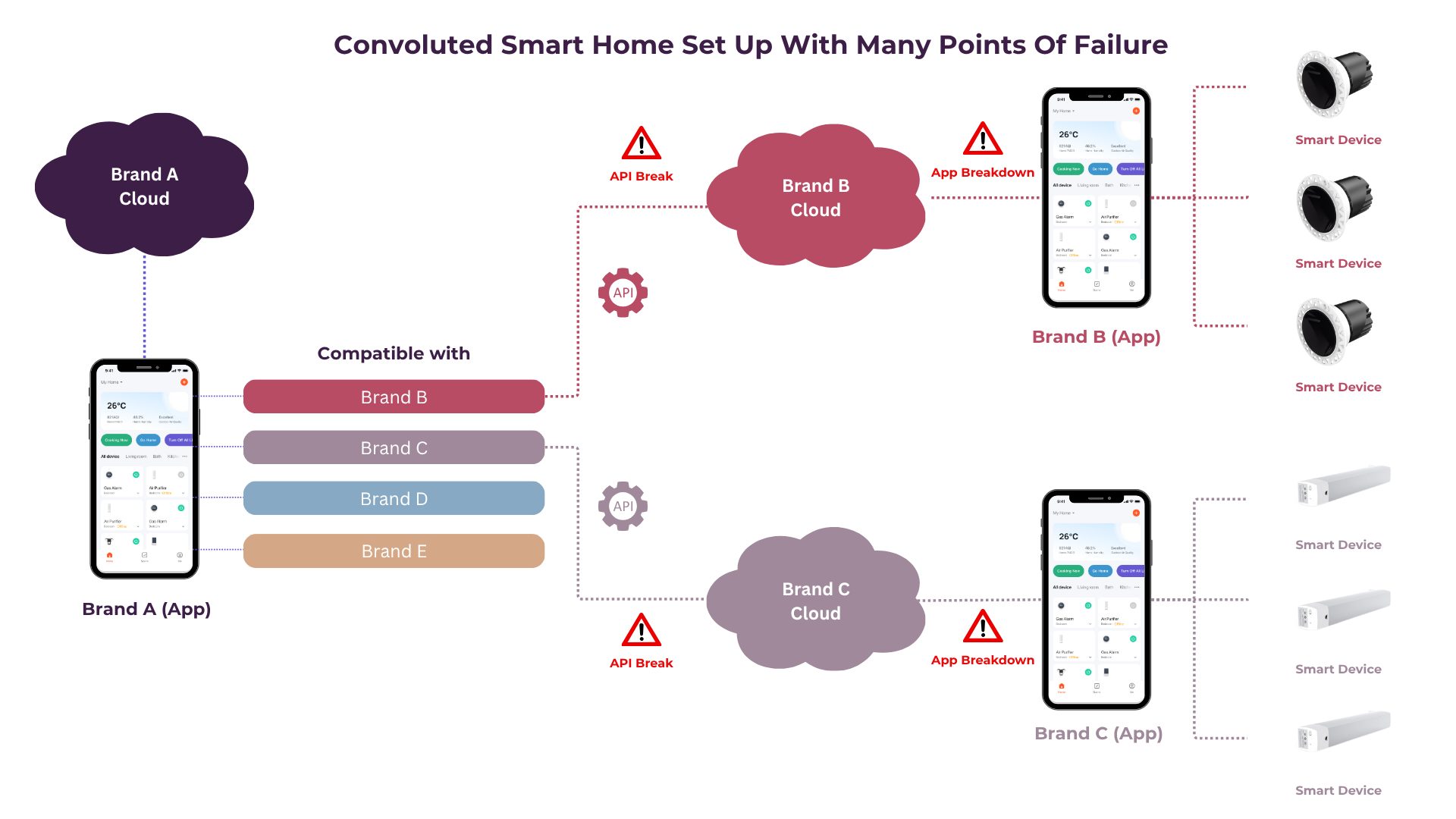
The Hidden Pitfalls of Cross-Brand “Compatibility” via API Calls
While Brand A may advertise cross-brand compatibility, in most cases this means linking different brand apps using cloud-to-cloud API integrations — and this comes with several downsides:
1. Reliance on Cloud = Slower Response Times
2. Multiple Apps = Complex Setup & Poor User Experience
3. API Changes Can Break Your Setup
4. Security & Privacy Concerns
5. Automations Are Less Reliable
Now compare that to a simple, well-connected setup: one app, one hub, and all your devices working together smoothly—even if your Wi-Fi goes down. Many smart devices can run locally, which means they’ll still work inside your home without needing the internet.
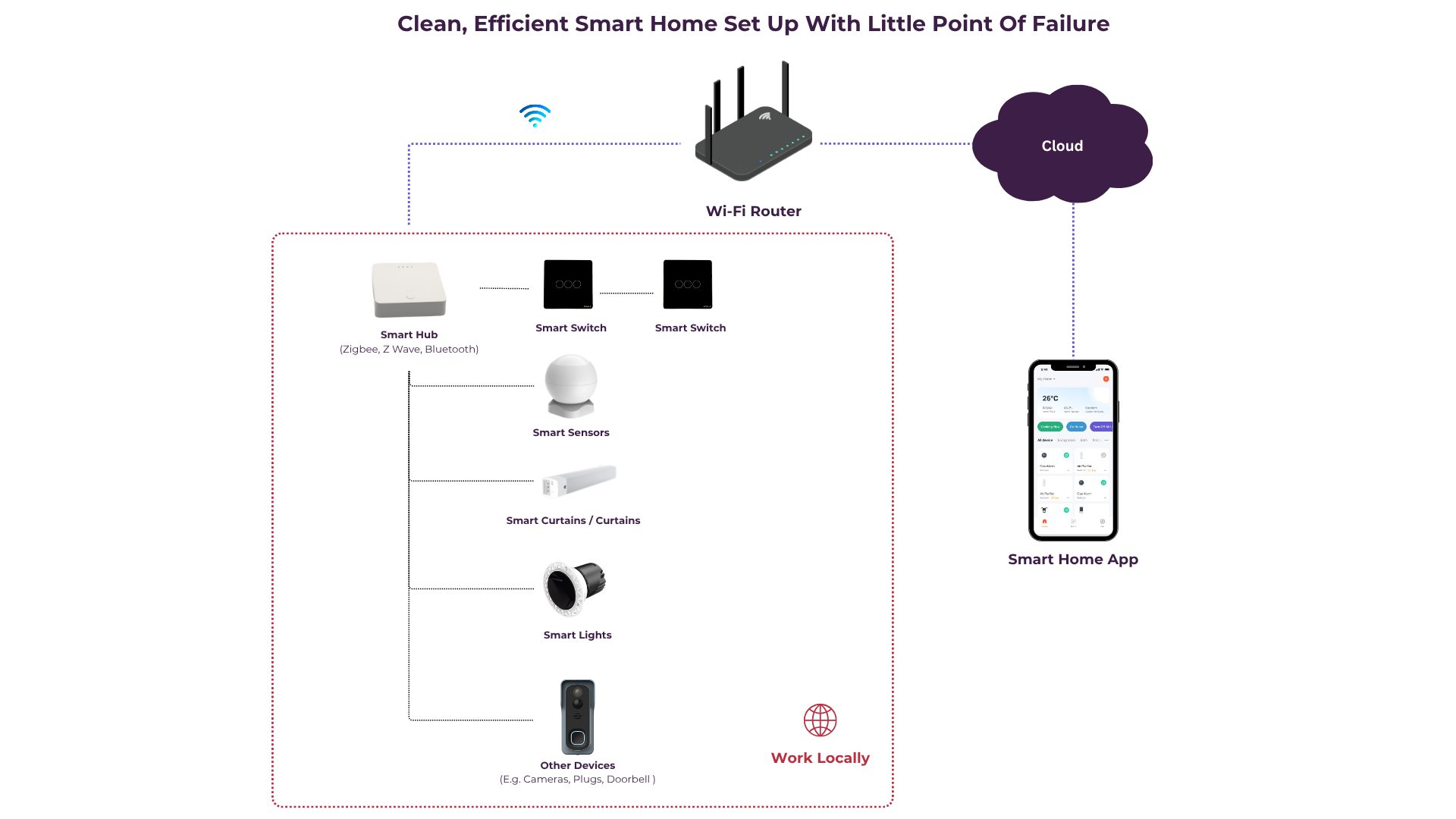
That’s the kind of smart home we recommend. Easy to use, reliable, and built to make everyday life more convenient.
Let’s talk about how everything connects behind the scenes.
Setting up a smart home isn’t just about the devices. It’s also about the platform or app you’ll use to control everything. Think of this as your smart home’s brain. The better the platform, the smoother your experience.
These apps are user-friendly, powerful, and built for flexibility. Whether you’re setting up a single smart bulb or a whole-home system, you’ll get full control from one place.
Here’s what you can do:
Smart Tip: Smart Life is Tuya-based, so it supports a wide range of devices. That means more options, easier expansion, and fewer compatibility headaches down the road.
Xiaomi devices are sleek and well-priced, but they work best within their own system. That means limited compatibility with other brands or platforms. It can be great for simple setups, but if you plan to expand or mix brands, you might hit some walls.
Want to control your home just by talking to it? Voice assistants make it easy, hands-free and they work great with most smart home setups in Singapore too. Here’s a quick look at your options:
“Hey Google, turn off the lights.”
A popular choice among Android users in Singapore. It works smoothly with Smart Life (Tuya-based) devices, and the Google Home app gives you a nice visual dashboard to control your home. Many local smart brands support Google integration out of the box.
“Alexa, play music and set the lights to Relax Mode.”
While it’s more common in the US, Alexa is gaining popularity here too, especially among tech enthusiasts. It offers powerful routines and wide compatibility. If you’re using Echo speakers or have friends who’ve bought Alexa-enabled devices from Amazon, this can be a fun and flexible option.
“Hey Siri, I’m home.”
If you’re team iPhone, this is your go-to. Apple Home provides a sleek, private, and secure experience. It works best with HomeKit-compatible devices which are becoming more available in Singapore. Perfect for Apple lovers who want a tightly integrated system with strong privacy.
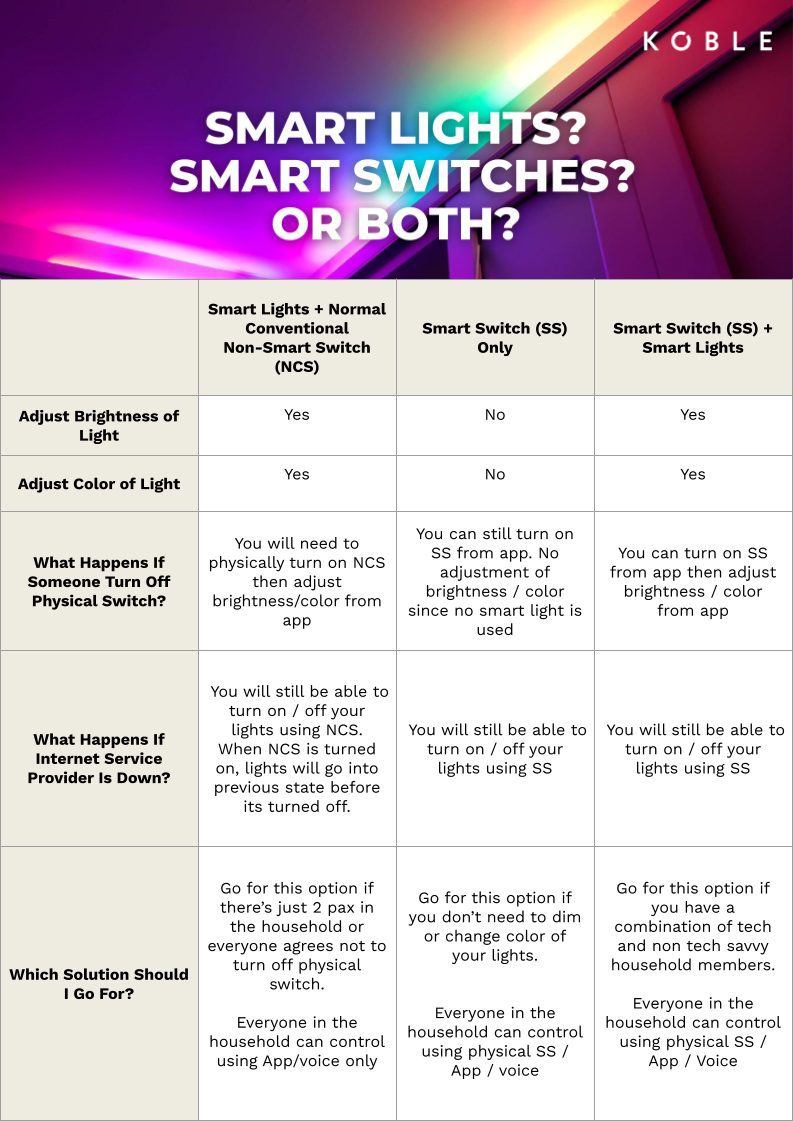
Not sure which setup works best for you? You’re definitely not alone. Choosing between smart lights , smart switches, or both really comes down to how you live and how hands-on (or hands-free) you want to be.
Here’s a quick breakdown to help you decide:
Smart Lights + Regular Wall Switches
A great starting point if you’re just beginning your smart home journey. You’ll enjoy app control, dimming, and colour-changing features while keeping your familiar wall switch. Just remember that if someone turns off the switch, your smart lights go offline until it’s flipped back on.
Best For: Beginners or renters who want to experiment without rewiring or committing fully.
Smart Switches Only
If you like the convenience of smart control but don’t want to replace every light bulb, this is a practical choice. Smart switches give you voice and app control using your current lights, while keeping the physical switch everyone’s used to.
Best For: Families who prefer using physical switches but still want the perks of smart tech.
Smart Switches + Smart Lights
This combo gives you the most flexibility and customisation. You can control lights at the switch, through the app, or by voice. Plus, you unlock advanced features like adjusting colour temperature, setting moods, or automating by time of day or activity. Even if the wall switch is off, your lights stay connected and smart.
Best For: Smart home lovers who want full control, convenience, and creative lighting.
Still not sure what’s right for you? Start small and build up based on how you actually use your space. There’s no wrong choice—just the one that fits your space and lifestyle best.
Wiring might sound technical, but choosing the right smart switch doesn’t have to be.
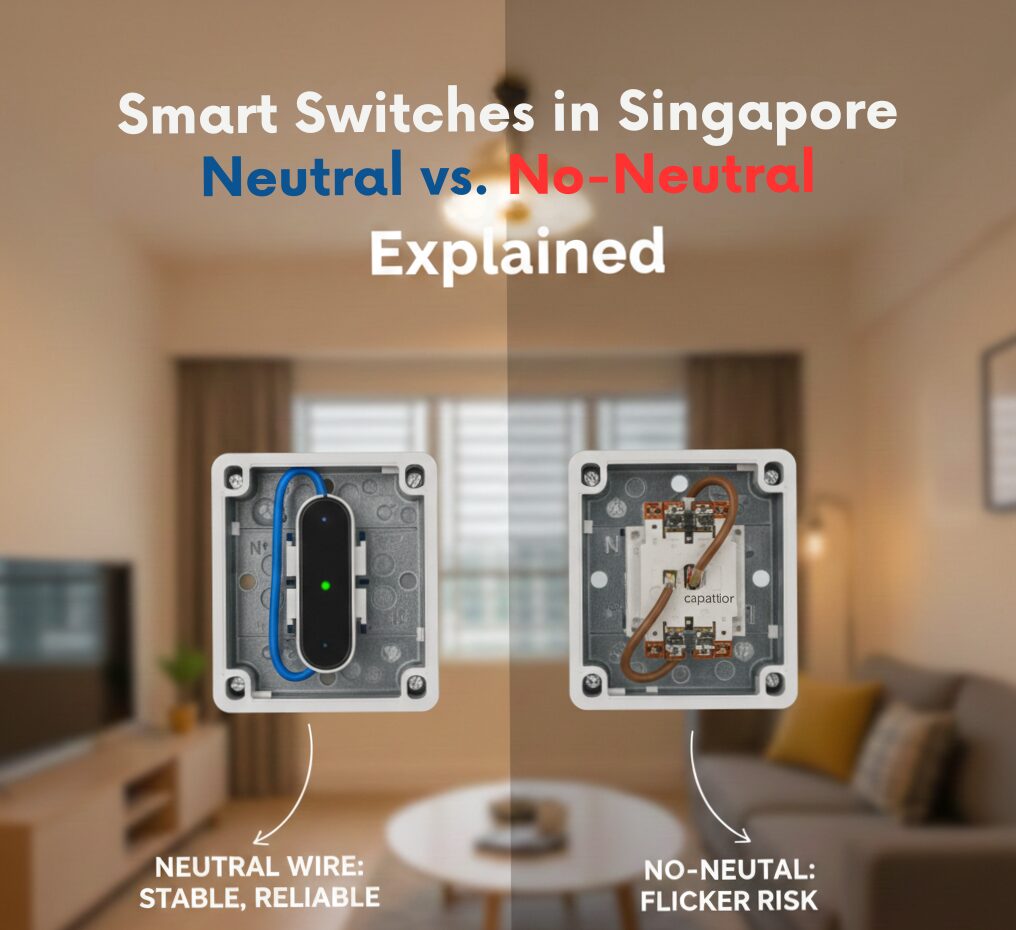
When it comes to smart switches, you’ll see two types: neutral and no-neutral. The difference comes down to the kind of wiring in your walls. And here’s something important to know upfront:
Most homes in Singapore do NOT have neutral wires in the light switch boxes by default.
So unless you’ve specifically asked your electrician to pull neutral wires to every light switch point (or you’re 100% sure they’re already there), you’ll likely need a no-neutral smart switch.
No-Neutral Smart Switches
Designed for homes that don’t have neutral wires—aka, most homes in Singapore.
No-neutral switches are designed to work without a neutral wire, making them perfect for retrofitting into older homes.
Best for: Most HDBs, condos, and landed homes unless you’ve done custom rewiring.
Installation Tip: No extra wiring needed—just replace the existing switch
Smart Insight: Great for retrofitting smart controls without opening up walls or pulling extra cables
Neutral Wire Smart Switches
These require a neutral wire at the switch point to work properly. If you’re building or rewiring your home, it’s a good idea to ask your electrician to pull neutral wires to all switch points. Why? Because neutral switches offer some extra perks.
Best for: New builds, major renos, or when you’ve confirmed neutral wires are present. Ideal if you want maximum performance and future-proofing for your smart system.
Still unsure what’s behind your switch faceplate? Just snap a photo and reach out to us. We’ll help you figure it out so you can get the right switch the first time.
Building a smart home doesn’t have to be complicated or expensive. Start with the basics that make your day-to-day easier—like smart switches, lighting, or a video doorbell. As you get more comfortable, you can slowly add on features like sensors, climate control, or automated curtains to match your lifestyle.
And remember, you don’t have to do it all at once. The best smart homes are built step by step, with the right setup that works for you.
Still have questions? We’re always here to help. Whether it’s choosing the right product, understanding compatibility, or figuring out your first automation, we’ve got your back.
[sc name=”secondarynavi”][/sc]
[sc name=”blogconclusion”][/sc]

Koble Showroom
(With Smart Home Specialist)

Revolutionise Energy Consumption With Smart Parking Lot Lights
June 7, 2024
Can Your Smart Home Still Function Without the Internet?
September 27, 2024

Smart Curtain Singapore Price
March 15, 2024

Smart Home Privacy and Security: Safeguarding Your Data in the Connected World
June 21, 2024
Koble Smart Home